


Understanding Static Preamble Puncturing in Wi-Fi 7

Why Preamble Puncturing Needs Validation
Wi-Fi 7 supports channel widths of up to 320 MHz. When a portion of a wide channel becomes unavailable, it is important to understand how the AP communicates that change, how connected clients respond, and how traffic behaves over the remaining usable bandwidth.
For device makers and Wi-Fi validation teams, checking feature support alone is not enough. Validation also needs to examine the over-the-air behavior and measure the impact on active traffic.
What Needs to Be Verified
- How the punctured portion is indicated by the AP.
- What changes can be observed in the Beacon and Action frames.
- How the punctured subchannels are represented through the Disabled Subchannel Bitmap.
- Whether the puncturing information can also be observed in the transmitted QoS data frames.
- How the available bandwidth and throughput change after puncturing.
This use case focuses on static preamble puncturing using a Wi-Fi 7 AP and one SG7 client.
Before Starting the Validation
A 320 MHz Wi-Fi 7 channel consists of 16 × 20 MHz subchannels.
When preamble puncturing is used, selected subchannels within this 320 MHz channel can be marked as unavailable, while transmission continues over the remaining subchannels.
For example:
320 MHz with 40 MHz punctured
- Total configured bandwidth = 320 MHz
- Punctured bandwidth = 40 MHz
- Remaining usable bandwidth = 280 MHz
Similarly:
320 MHz with 80 MHz punctured
- Total configured bandwidth = 320 MHz
- Punctured bandwidth = 80 MHz
- Remaining usable bandwidth = 240 MHz
In this validation, the puncturing pattern was applied through AP configuration/command. Therefore, the scope is static preamble puncturing.
Test Setup
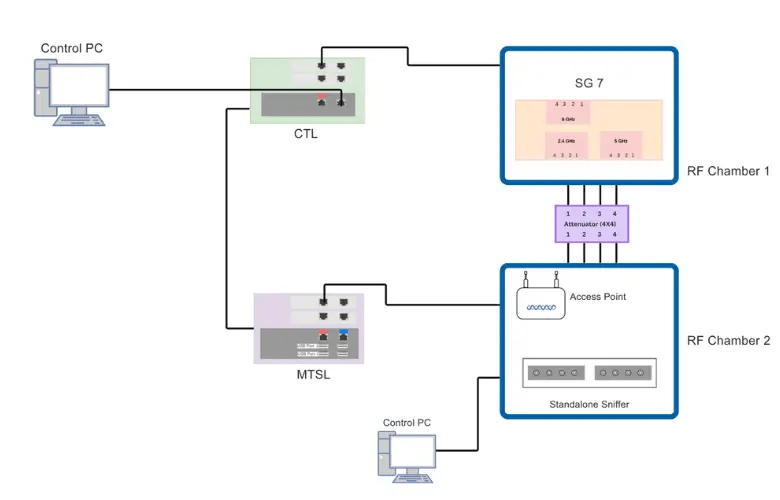
The following setup was used for the validation:
- Wi-Fi 7 Reference AP - 4x4
- SG7 as the Wi-Fi 7 client
- Multiband Sniffer for packet capture
- WiCheck Controller Lite (CTL) for test execution
- Managed Traffic Server Lite (MTSL) for traffic execution
- RF chambers and attenuators
The AP and SG7 were configured for 802.11be operation. One SG7 client was connected to the AP, and Iperf3 TCP downlink traffic was used to observe behavior before and after puncturing.
Testbed Overview:
Experiment 1: Establishing the No-Puncturing Baseline
A baseline helps determine how the connection behaves before puncturing is introduced, providing a reference for comparing bandwidth and throughput in the subsequent scenarios.
The AP was configured with 320 MHz bandwidth, and one 4x4 SG7 Wi-Fi 7 client was connected. The EHT capability of the connection was verified, and Iperf3 TCP downlink traffic was started for 120 seconds with 10 parallel streams.
At this stage, no part of the 320 MHz channel was punctured.
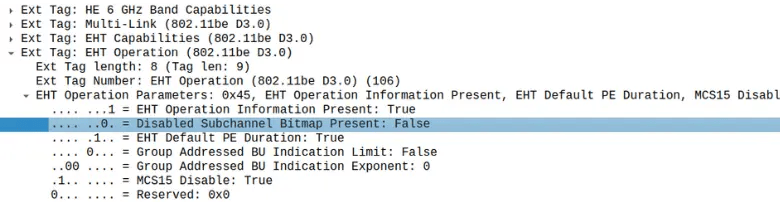
In the Beacon capture, Disabled Subchannel Bitmap Present = False, confirming that the AP was not advertising any punctured subchannels.
The observed result was:
| Parameter | Observation |
|---|---|
| Client | 1 SG7 |
| Mode | 802.11be |
| NSS | 4 |
| Configured BW | 320 MHz |
| Punctured BW | None |
| TCP DL Throughput | 5549 Mbps |
This result serves as the baseline for comparison with the punctured cases.


Experiment 2: Validating 40 MHz Puncturing
The 40 MHz scenario examines whether puncturing information is communicated over the air and how the connected client and active traffic behave after the configuration changes.
The AP continued operating at 320 MHz with the SG7 client connected. Initially, there was no puncturing. The packet capture below shows that the Disabled Subchannel Bitmap was not present.
Iperf3 TCP downlink traffic was executed for 120 seconds with 10 parallel streams. While TCP downlink traffic was running, the command was applied to puncture the required 40 MHz portion.
The required 40 MHz puncturing bitmap was set on the AP using the supported AP command.
After applying the command, packet capture was used to verify the resulting over-the-air behavior rather than relying only on the AP configuration.
The Sequence Observed

How Did the Connected Client Know About the Change?
Action Frame Observation
A key validation point is whether an already-associated client receives updated bandwidth information when the puncturing configuration changes.
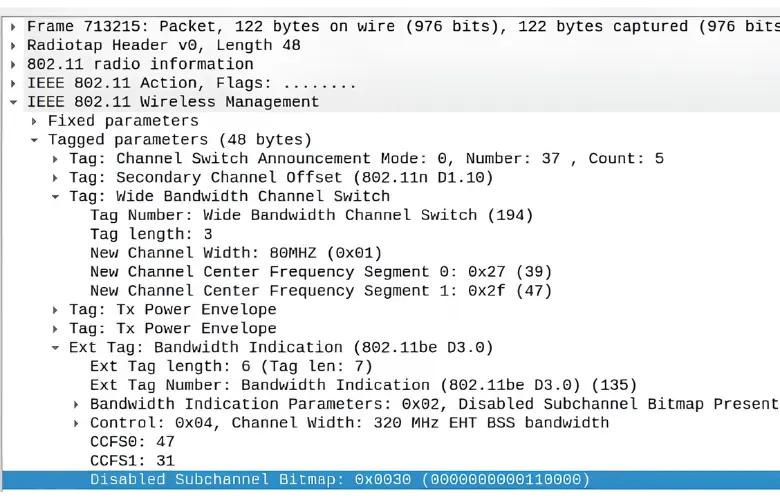
The SG7 client was already connected when the puncturing command was applied. After the command was applied, the AP sent an Action Frame carrying the updated bandwidth information to the associated client.
In Wireshark, this was observed under:
Wireless Management
  -> Tagged Parameters
     -> Extended Tag: Bandwidth Indication
        -> Disabled Subchannel Bitmap
This allowed verification that the client was informed about which portion of the operating channel had become unavailable.
What Did the Disabled Subchannel Bitmap Tell Us?
The Disabled Subchannel Bitmap helps identify which 20 MHz portions within the configured 320 MHz channel are unavailable.
For the captured Disabled Subchannel Bitmap:
- Each bit represents a 20 MHz subchannel.
- 0 represents an active subchannel.
- 1 represents a punctured/disabled subchannel.
- The bitmap is interpreted from right to left.
This allows the AP puncturing configuration to be correlated with the Disabled Subchannel Bitmap and the actual punctured portion of the channel.
AP puncturing configuration
↓
Disabled Subchannel Bitmap
↓
Actual punctured portion of the channel
The packet capture therefore provided independent confirmation of the AP configuration rather than relying only on command execution.
Can We See the Puncturing Information in Data Traffic?
The QoS data frames were also checked while traffic was running. In the RadioTap information, under
U-SIG
  -> EHT MU PPDU
     -> Punctured Channel Information
The puncturing field corresponding to the configured pattern was observed.
For the 40 MHz puncturing case shown in the capture, the field value was 3.

In the screenshot below, field value 3 is set when the 3rd 40 MHz portion is punctured within the full 320 MHz bandwidth.
| PPDU bandwidth | Cases | Puncturing pattern (RU or MRU Index) | Field value |
|---|---|---|---|
| 320 MHz | No puncturing | [1 1 1 1 1 1 1 1] (4×996-tone RU 1) | 0 |
| 40 MHz puncturing | [x 1 1 1 1 1 1 1] (3×996+484-tone MRU 1) | 1 | |
[1 x 1 1 1 1 1 1] (3×996+484-tone MRU 2) | 2 | ||
[1 1 x 1 1 1 1 1] (3×996+484-tone MRU 3) | 3 | ||
[1 1 1 x 1 1 1 1] (3×996+484-tone MRU 4) | 4 | ||
[1 1 1 1 x 1 1 1] (3×996+484-tone MRU 5) | 5 | ||
[1 1 1 1 1 x 1 1] (3×996+484-tone MRU 6) | 6 |
What Happened to the Throughput?
After puncturing 40 MHz:
- Configured BW = 320 MHz
- Punctured BW = 40 MHz
- Remaining usable BW = 280 MHz
The observed TCP downlink throughput was 4618 Mbps.
With 40 MHz punctured, 280 MHz out of 320 MHz remained usable (87.5% of the configured bandwidth). The measured throughput retained 83.2% of the no-puncture baseline (4618 Mbps compared with 5549 Mbps). This is a difference of about 4.3 percentage points from the usable-bandwidth ratio.
The client remained connected with NSS 4, and traffic continued after the puncturing configuration was applied.
Experiment 3: Validating 80 MHz Puncturing
The 80 MHz scenario extends the validation to a larger punctured portion of the 320 MHz channel, allowing the resulting packet-level behavior and traffic performance to be compared with the baseline and 40 MHz case.
The AP remained configured with 320 MHz bandwidth, and one 4x4 SG7 Wi-Fi 7 client was connected. Iperf3 TCP downlink traffic was executed for 120 seconds with 10 parallel streams.
While the traffic was running, the command was applied on the AP to puncture the required 80 MHz portion. Packet capture was then used to verify how the updated puncturing information was advertised over the air.
Packet Capture Observation
Before applying the puncturing command, the Beacon showed Disabled Subchannel Bitmap Present = False, confirming that no subchannel was punctured.
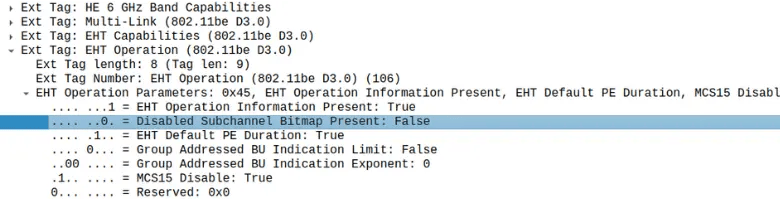
The Disabled Subchannel Bitmap identified the 20 MHz subchannels that were disabled by the new puncturing configuration. Since the SG7 client was already associated, the updated bandwidth information was also communicated to the client through an Action Frame.
Understanding the Bitmap
For the Disabled Subchannel Bitmap:
- 0 = Active 20 MHz subchannel
- 1 = Punctured/Disabled 20 MHz subchannel
- Each bit represents one 20 MHz subchannel.
- The bitmap is read from right to left.
This helps correlate the AP configuration with the puncturing information advertised over the air.
After the 80 MHz puncturing command was applied, the Beacon showed Disabled Subchannel Bitmap Present = True. The updated bitmap indicated the subchannels that were disabled after applying the puncturing configuration.
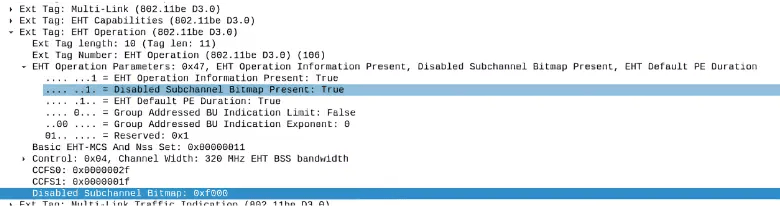
This provides a before-and-after comparison of the AP advertisement for the 80 MHz puncturing case.
Puncturing Information in Data Frames
The QoS data frames were checked while traffic was running. Under
RadioTap -> U-SIG -> EHT MU PPDU -> Punctured Channel Information
The corresponding puncturing information was observed.
For this 80 MHz puncturing case, the captured field value was 12.

The field-value mapping also shows that value 12 corresponds to the 4th 80 MHz portion being punctured within the 320 MHz PPDU.
| PPDU bandwidth | Cases | Puncturing pattern (RU or MRU Index) | Field value |
|---|---|---|---|
| 320 MHz | 80 MHz puncturing | [x x 1 1 1 1 1 1] (3×996-tone MRU 1) | 9 |
[1 1 x x 1 1 1 1] (3×996-tone MRU 2) | 10 | ||
[1 1 1 1 x x 1 1] (3×996-tone MRU 3) | 11 | ||
[1 1 1 1 1 1 x x] (3×996-tone MRU 4) | 12 |
Action Frame Observation
Since the SG7 client was already associated when the puncturing configuration was changed, the AP sent an Action Frame carrying the updated Bandwidth Indication information.
In Wireshark, this was observed under
Wireless Management -> Tagged Parameters -> Extended Tag: Bandwidth Indication -> Disabled Subchannel Bitmap
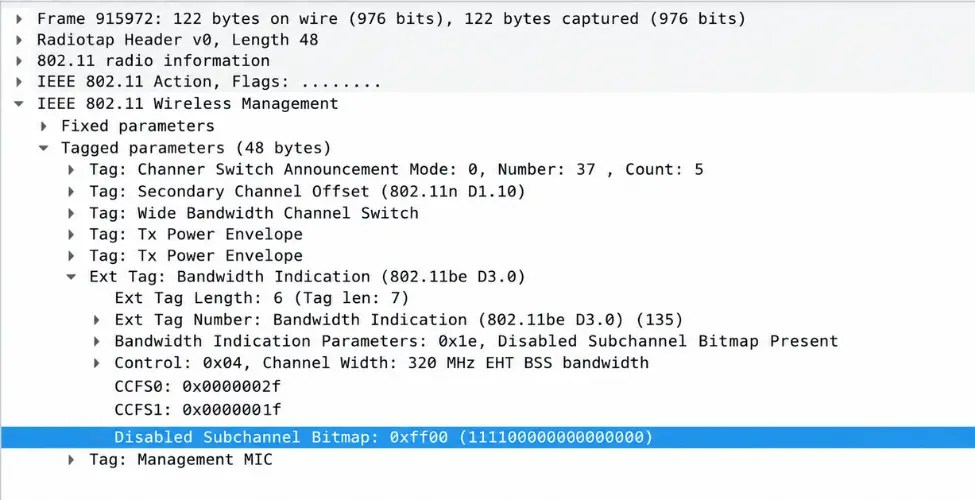
After the puncturing configuration was changed, the updated Bandwidth Indication information was observed in the Action Frame sent to the already-associated SG7 client.
What Happened to the Throughput?
After puncturing 80 MHz:
- Configured BW = 320 MHz
- Punctured BW = 80 MHz
- Remaining usable BW = 240 MHz
The SG7 client remained connected with NSS 4, and TCP downlink traffic continued after the puncturing configuration was applied.
Observed TCP DL Throughput = 4288 Mbps
For the 80 MHz case, 75% of the original bandwidth remains usable, while the measured throughput is 77.3% of the baseline. Throughput retention is about 2.3 percentage points higher than the proportional bandwidth value.
This shows that even after an 80 MHz portion of the 320 MHz channel was punctured, the client remained connected and traffic continued over the remaining usable bandwidth.
Comparison of the Three Experiments
| Scenario | Configured BW | Remaining Usable BW | BW retained | TCP DL | Throughput retained vs baseline |
|---|---|---|---|---|---|
| No puncturing | 320 MHz | 320 MHz | 100% | 5549 Mbps | 100% |
| 40 MHz punctured | 320 MHz | 280 MHz | 87.50% | 4618 Mbps | 83.20% |
| 80 MHz punctured | 320 MHz | 240 MHz | 75% | 4288.25 Mbps | 77.30% |
The results show the relationship between the punctured portion and the remaining usable bandwidth.
Beyond the throughput change, packet captures allowed the complete behavior to be checked from the AP configuration to the actual over-the-air indication.
What Does This Validation Demonstrate?
1. Puncturing Does Not Mean Changing the Complete Channel Width
The AP continued to operate with a configured bandwidth of 320 MHz. Only the selected 20 MHz subchannels within the 320 MHz channel were marked as unavailable.
- 40 MHz punctured → 280 MHz remains usable
- 80 MHz punctured → 240 MHz remains usable
2. Puncturing Can Be Verified Directly from the Packet Capture
Validation did not rely only on the AP configuration or command. Before puncturing, the Beacon showed Disabled Subchannel Bitmap Present = False. After puncturing, the updated disabled-subchannel information was visible in the packet capture.
This provided direct over-the-air confirmation of the configured puncturing behavior.
3. The Connected Client Is Informed When the Puncturing Configuration Changes
Puncturing was applied while the SG7 client was already connected and traffic was running. After the configuration change, the AP sent an Action Frame containing the updated Bandwidth Indication information to the associated client.
4. Traffic Continued After Puncturing
For both 40 MHz and 80 MHz puncturing, the SG7 client remained connected and TCP traffic continued over the remaining usable bandwidth.
Overall Conclusion
For Wi-Fi 7 APs operating at 320 MHz, validating preamble puncturing involves more than checking feature support. It is important to examine how the AP communicates the change, how the connected client is informed, and how traffic behaves over the remaining usable bandwidth.
Starting with a no-puncture baseline, 40 MHz and 80 MHz puncturing were applied while the SG7 client was connected and TCP traffic was running. Packet captures were used to observe behavior before and after puncturing, verify the Disabled Subchannel Bitmap, observe the Action Frame sent to the associated client, and correlate the puncturing information with the U-SIG information in QoS data frames.
The validation confirmed that when a portion of the 320 MHz channel was punctured, the client remained connected and traffic continued over the remaining usable bandwidth.
With WiCheck and SG7, this validation combines controlled test execution, packet-level visibility, and traffic measurements to assess static preamble puncturing beyond feature-level verification.


