


OFDMA Performance Testing with WiCheck
Is the AP Really Using OFDMA Effectively?
Supporting OFDMA is no longer enough. For Wi-Fi 6 and Wi-Fi 7 AP vendors, the real question is whether the AP is using OFDMA effectively under real-world multi-client conditions.
When client density increases, AP vendors and QA teams need clear visibility into:
-
- Whether the AP is actually scheduling multi-user (MU) transmissions or falling back to single-user (SU)
- How efficiently Resource Units (RUs) are allocated across clients
- Whether the scheduler distributes resources fairly or leaves some clients underserved
- How throughput and latency change as the number of active clients increases
- Whether the AP selects OFDMA or MU-MIMO when both multi-user modes are possible
OFDMA (Orthogonal Frequency Division Multiple Access) is a defining efficiency feature of Wi-Fi 6 (802.11ax) and Wi-Fi 7 (802.11be). Instead of giving the entire channel to one client at a time, the AP divides each transmission into Resource Units (RUs) and can serve multiple clients simultaneously.
The challenge is not verifying OFDMA support. It is validating how effectively the AP uses it.
Validate OFDMA Behavior Without an External Sniffer
WiCheck provides a repeatable approach to validating OFDMA performance using real Wi-Fi clients and built-in air-interface analysis.
WiCheck simulates up to 24 real Wi-Fi clients against the AP under test, drives controlled traffic (TCP/UDP via iperf, VoIP/SIP), and captures the air interface internally on each client.
After each traffic run, WiCheck analyzes the captures to identify OFDMA scheduling behavior and automatically converts the results into a detailed report.
This provides development and QA teams with visibility into AP behavior over the air-without setting up an external sniffer or manually decoding pcaps.
What WiCheck Measures
| Category | Metrics |
|---|---|
| MU efficiency | HE/EHT MU PPDU vs. SU PPDU counts per client, downlink and uplink; MU% ratio per group size. |
| RU allocation | Distribution of RU sizes used (26, 52, 106, 242, 484, 996, 2×996 … 4×996 tones). |
| Uplink scheduling | Trigger frames: BSRP, MU-BAR, Block ACK, Null frames |
| MU-MIMO vs OFDMA | Distinguished via HE-SIG-B compression, identifying the multi-user mode selected by the AP. |
| Fairness | Per-client data allocation share (pie charts, up to 16 clients). |
| Performance | Aggregate and per-client throughput, latency over time, MCS distribution, connection stability. |
Test OFDMA Across Real-World Wi-Fi 7 Conditions
WiCheck provides ready-to-run OFDMA test scenarios across bands, channel widths, security modes, traffic types, and traffic directions.
Wi-Fi 7 OFDMA Test Pack
Thirteen ready-to-run test cases cover the full band and direction matrix with 12 simultaneous Wi-Fi 7 clients (2× MRT7 radio heads in 6+6 mode).
| Scenario | Band | Channel Widths | Security | Direction |
|---|---|---|---|---|
| Throughput (TCP) | 2.4 / 5 / 6 GHz | up to 320 MHz | WPA2/WPA3 | UL and DL |
| Goodput (UDP) | 2.4 / 5 / 6 GHz | up to 320 MHz | WPA2/WPA3 | UL and DL |
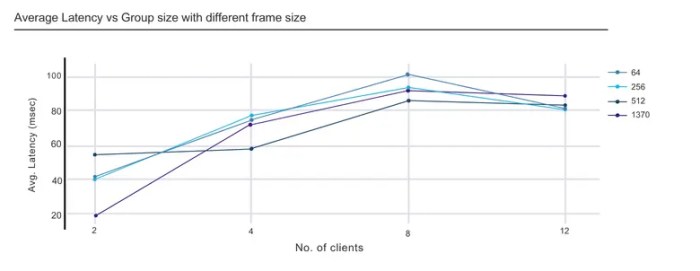
Each run produces throughput charts, latency graphs, MU/SU ratios, RU allocation charts, and per-client allocation breakdowns in a single automated PDF/HTML report.
Sample Charts and Stats



Turn OFDMA Measurements into AP Performance Insights
The results provide engineering and QA teams with visibility into AP behavior as client density and traffic conditions change.
WiCheck determines:
-
- Whether OFDMA is actually triggered under realistic multi-client load, per band and per direction
- How the AP’s RU scheduler behaves, from conservative large-RU allocation to aggressive small-RU multiplexing
- Whether the AP prefers OFDMA or MU-MIMO for a given client mix
- The real capacity and latency benefit OFDMA delivers as client density grows
- Whether resources are allocated fairly across clients
Validate Firmware Changes with Repeatable OFDMA Testing
During AP firmware and driver development, WiCheck provides a repeatable, instrumented client population.
Verify OFDMA Scheduler Behavior
After a scheduler or driver change, the same Wi-Fi 7 test case can be run and the MU% ratio compared. A drop from MU to SU transmissions becomes immediately visible, per band and per direction.
Isolate Firmware Changes
The same client mix, traffic profile, packet size, and duration can be maintained for every run. Changes in RU allocation or MU ratio between builds can therefore be evaluated against the firmware change.
Debug Uplink Scheduling
Trigger-frame counters (BSRP, MU-BAR, Null) reveal whether the AP is soliciting uplink buffer status correctly, without setting up a sniffer or manually decoding pcaps.
Automate OFDMA Regression and Release Validation
QA teams can run the same OFDMA tests as automated campaigns:
-
- Regression campaigns: The OFDMA test cases are standard Robot Framework tests, so they slot into WiCheck campaigns alongside throughput, roaming, and security tests. One campaign validates a release candidate overnight, unattended.
- Pass/fail against baselines: Per-group-size throughput, latency, and MU-efficiency numbers from a known-good build become the baseline; regressions in any metric surface in the automated report comparison.
- Full matrix coverage: One Click Mode Wi-Fi 7 test cases cover 2.4/5/6 GHz, 20 MHz through 320 MHz, WPA2/WPA3, uplink and downlink.
- Scale and fairness sign-off: The 37-client DL RU-allocation test and group-size scaling tests (2 → 12 clients) confirm the AP holds up as density grows, while the per-client allocation charts show whether any client is being starved.
- Evidence for release notes: Every run ends in a timestamped PDF/HTML report with charts and tables, ready to attach to a bug ticket or release sign-off.
Validate More Than OFDMA Support
Go beyond confirming OFDMA support. Validate how effectively the AP schedules clients, allocates RUs, balances resources, and maintains throughput and latency as client density increases.
WiCheck combines repeatable OFDMA testing, built-in air-interface analysis, automated test execution, and measurable evidence for firmware validation, regression testing, and release sign-off.


