The Rapid Development Kit (RDK) is an open-source software platform designed to accelerate the development and deployment of connected devices. Specifically, RDK-B (RDK for Broadband) is a modular software stack tailored for broadband devices. It offers a unified software foundation compatible with various hardware technologies, including DOCSIS, GPON, and DSL. By standardizing the software layer, RDK-B enables operators to streamline the development and deployment of broadband services.
A key feature of RDK-B is its modular design, powered by the Common Component Service Platform (CCSP), which provides reusable components and APIs to deliver essential services across devices.
Testing in RDK-B
As RDK-B becomes the backbone for a growing number of OEMs and ISPs, robust testing has become a critical part of the development process. To address increasing complexity and scalability needs, the Test Development Kit (TDK) offers a unified solution for reliable, repeatable, and scalable testing across RDK-B components.
TDK Automation Framework
TDK is RDK’s dedicated automation framework, built to validate the functionality of RDK components through standardized test suites. It supports both unit and integration testing by leveraging component-level APIs—for instance, components like OneWifi or CMAgent. The TDK framework is composed of multiple modules:
-
- TDK Test Manager (TM) Server: Acts as the core controller that receives REST API calls from test scripts and coordinates actions with client devices and the RDK-B Device Under Test (DUT).
- Test Manager Agent: Embedded within the RDK-B DUT, this agent communicates with CCSP components via REST APIs to perform the required test operations.
The interaction between the TDK Test Manager and the RDK-B DUT during component testing is illustrated below:
Sample TDK Test Script
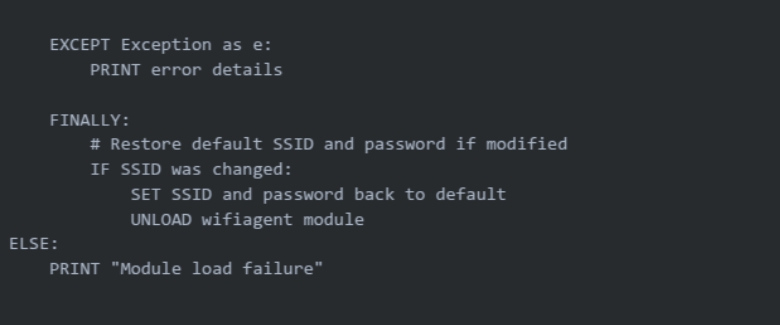
All the TDK scripts follow a defined set of steps. A sample test is explained with the pseudo code for testing the OneWiFi component. DUT is configured for specific Wi-Fi configurations. Multiple Wi-Fi clients are connected to the DUT. After a successful connection, run traffic (iperf3).
1. Import libraries and set variables:

2. Load the module to be tested and set the configurations:
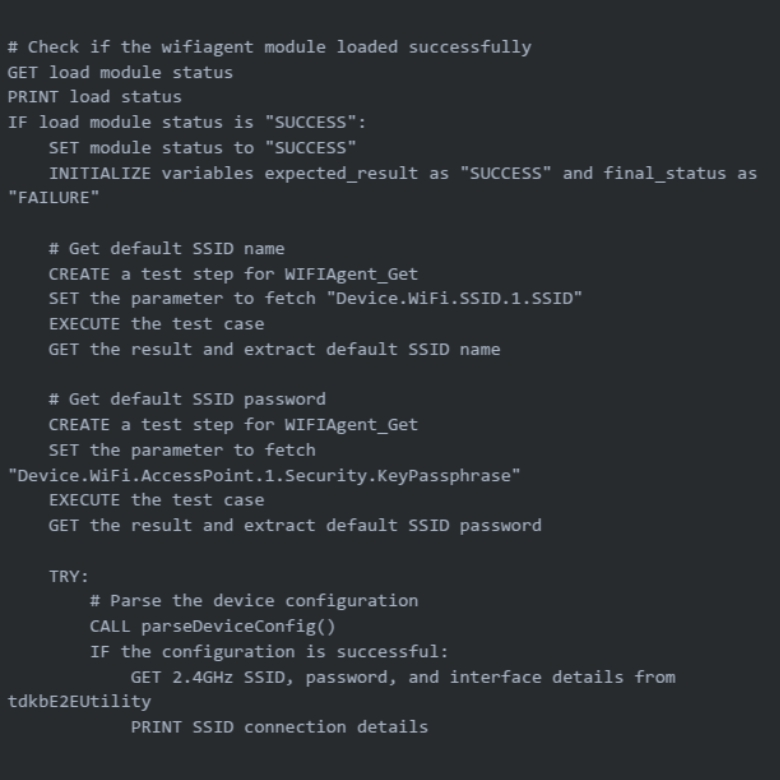
3. Verification/functionality of test case:

4. Module unloading and error handling:
Sample TDK Test Report
The TDK automation tool generates detailed test reports for each executed test case. Shown below is a snapshot of a test case that initiates TCP uplink traffic from all connected Wi-Fi clients:

Enabling Scalable RDK-B Testing with Alethea
As RDK-B continues to shape the broadband industry by offering a unified and modular software foundation, the need for consistent, automated, and scalable testing becomes more critical than ever. Tools like the Test Development Kit (TDK) are essential in ensuring that RDK components meet high reliability and performance standards. However, TDK primarily focuses on API-level testing of individual RDK components. Comprehensive validation of a broadband device requires broader test coverage, including functionality, performance, load, and scalability testing. At Alethea, we bring deep expertise in test automation for networking and connected devices, offering complete solutions—from framework design to test execution and reporting. Our focus on flexibility, cost-effectiveness, and continuous optimization positions us as a trusted partner in accelerating RDK-B adoption and delivering robust, future-ready broadband solutions.