


Validate Mixed Security Connectivity in Wi-Fi 7 Networks Using RSN Override (RSNO)


Ensure Legacy Compatibility Without Compromising Wi-Fi 7 Security
As Wi-Fi security evolves, access points increasingly need to support both legacy devices and modern Wi-Fi 7 clients on the same SSID.
Legacy STAs (typically Wi-Fi 4 or earlier) often expect only a single AKM and encryption cipher within the RSN Information Element (RSNE). At the same time, Wi-Fi 7 devices require newer security suites such as AKM 24 and SAE-EXT-KEY.
Without RSN Override (RSNO), configuring stronger security can prevent legacy devices from associating with the network. RSNO addresses this by allowing the standard RSNE to advertise universally supported security parameters while moving advanced security suites into separate RSN Override elements.
Validation Challenge
When an MRSNO-capable access point advertises multiple security profiles, validating client association becomes critical.
The objective is to verify that:
-
- Legacy clients connect using the standard RSN IE.
- RSNO-capable Wi-Fi 7 clients associate with their configured RSN Override profile.
- Multiple RSN advertisements are interpreted correctly by different client types.
- Client association occurs only with explicitly configured RSNs.
WiCheck enables validation of these scenarios using Scale Generator 7 (SG7).
Test Setup
Equipment
-
- MRSNO-Capable Access Point
- RSNO-Capable Wi-Fi 7 Clients (SG7)
- Legacy Wi-Fi Client
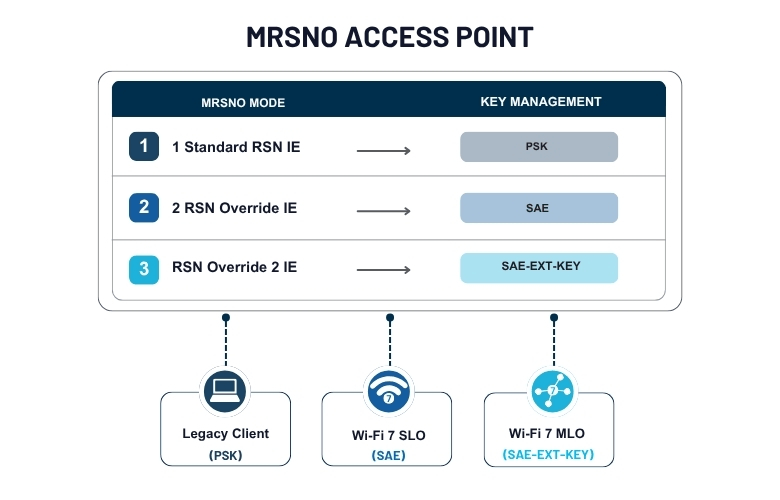
The MRSNO AP is configured to advertise:
| Advertisement | Security |
|---|---|
| Standard RSN IE | PSK |
| RSN Element Override | SAE |
| RSN Element Override 2 | SAE-EXT-KEY |
WiCheck SG7 is capable of connecting to one of the specific RSNs it is explicitly configured for, even when the AP broadcasts multiple RSN Information Elements (Standard RSN, RSN Override, and RSN Override 2).

Supported Client Validation
| Client | Security Used |
|---|---|
| Legacy Client | PSK |
| Wi-Fi 7 SLO Clients | SAE/SAE-EXT-KEY |
| Wi-Fi 7 MLO Clients | SAE-EXT-KEY |
Validation Scenarios
Scenario 1 – Legacy Client (PSK)
Validate that the legacy client connects using the standard RSN IE (PSK) while the access point simultaneously advertises newer security protocols.
Scenario 2 – SG7 SLO Client (SAE)
Validate that a Wi-Fi 7 client configured with the RSNO option connects to the SAE profile advertised in the RSN Element Override IE.
Scenario 3 – SG7 SLO Client (SAE-EXT-KEY)
Validate that a Wi-Fi 7 client connects using the SAE-EXT-KEY profile advertised in the RSN Element Override 2 IE.
Scenario 4 – SG7 MLO Client (SAE-EXT-KEY)
Validate that an MLO-capable Wi-Fi 7 client establishes a high-security connection using the SAE-EXT-KEY profile available in RSN Override 2.
| AP Advertisement | Security |
|---|---|
| Standard RSN IE | PSK |
| RSN Element Override IE | SAE |
| RSN Element Override 2 IE | SAE-EXT-KEY |
What WiCheck Validates
WiCheck enables validation of:
-
- Full AKM suite testing with RSNO enable/disable.
- Parallel validation of Standard RSN, RSNO, and RSNO2 on a single SSID.
- Correct client association with explicitly configured RSNs.
- Prevention of unintended or arbitrary RSN selection.
- Legacy and Wi-Fi 7 interoperability under Multiple RSN advertisements.
MRSNO and RSN Override provide an effective mechanism for supporting both legacy and modern Wi-Fi security requirements.
Using WiCheck, engineering teams can validate that legacy devices maintain connectivity while RSNO-capable Wi-Fi 7 clients correctly associate with their configured security profiles, enabling reliable interoperability across diverse client populations.


